


What to review before AI agents go on by default
NOV. 18, 2026
6 Min Read
A one-day permissions review, run before agentic features switch on, will prevent most of the access problems AI agents create.
Agent features are arriving as defaults. Claude Enterprise, for one, turns its unified experience on for eligible organizations on November 16 unless an admin has already made a choice. Once that happens, every employee with access can ask AI to open files, call connectors and act on systems. The identity question comes first, and most teams haven't answered it. Only 36% of organizations give agents a dedicated identity, according to a Cloud Security Alliance survey of IT and security professionals.
That number explains why the review has an order. Identity comes first, because connectors, file access, defaults, approvals and logs all depend on knowing who the agent is acting as. Get that wrong and every later control is attached to the wrong account.
Key Takeaways
- 1. Review AI agent identity first, because connector scopes, file access and approvals all attach to the account an agent acts under.
- 2. Keep AI agent permissions narrow by default and gate only the short list of actions that move money, edit shared records or leave the company.
- 3. Audit logs only protect you when a named person reviews them on a fixed schedule and the review repeats whenever access settings shift.
What an AI agent access review should cover
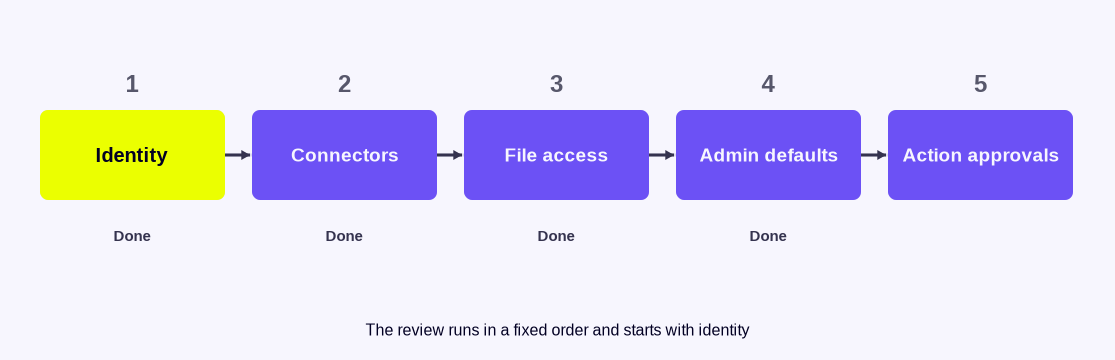
An AI agent access review checks five things in order. You confirm the identity each agent acts under, scope its connectors, match file access to existing labels, set admin defaults and decide which actions need approval. Audit logging then proves each of those controls is working.
Run it as a working session with the platform owner, a security lead and the owners of your two or three most connected systems. A typical sequence looks like this.
- Identity, so every agent action traces to a known account
- Connectors, so each one reaches only the systems a team needs
- File access, so agents inherit the sensitivity labels already in place
- Admin defaults, so new users start with a narrow setup
- Action approvals, so high-impact steps wait for a person
Give every agent an identity of its own
Each agent should act under an identity you can trace, revoke and log separately from any person. When an agent borrows a human account or a shared service account, you can't tell its actions apart from people's, and you can't cut its access without cutting theirs. A dedicated identity fixes both problems.
Shared accounts are the usual shortcut. A team wires an agent into its ticketing system with the same service account its scripts use. Six months later, a ticket gets closed by mistake, and the logs show only that the service account did it.
A separate identity also lets you set access by task. The agent that drafts replies gets read access, and the one that closes tickets gets write access to a single queue. Lumenalta®'s specialist teams set up identity this way first on governed AI rollouts, because connector scopes and approval rules attach to it.
Scope connectors to the systems each team needs
Connectors are the doors an agent walks through, so each one should open only the systems a team needs, with read and write access set separately. Turning on every connector for everyone is the fastest way to give an agent more reach than any single employee has.
A marketing team that needs its campaign folder and web analytics doesn't need the CRM write connector. If that connector is on by default, an agent asked to tidy a contact list could edit live customer records. Nobody intended it, and the setting still allowed it.
"Turning on every connector for everyone is the fastest way to give an agent more reach than any single employee has."
Start from a short list per team and add connectors on request. That puts the burden of proof on access, which is where it belongs.
File access should follow the labels you already trust
Agents should inherit the sensitivity labels and folder permissions you already maintain, so a file marked confidential stays out of reach for any session that shouldn't see it. Rebuilding file rules for AI is slow and drifts from the source.
Most firms already label HR, legal and finance folders. The review checks two things. Do those labels carry into an agent session, and are the folders without labels the ones you'd expect? A shared drive full of unlabeled board decks is the gap an agent will find first.
This step overlaps with data governance work you may already run. Agents working without a shared definition will guess, so business definitions and permissions belong in a governed catalog. For file access, the lesson is the same. An agent reads whatever context it can reach, so the labels on that context are your control.
Fix labels before launch where you can. Where you can't, keep those folders off the connector list until owners clean them up.
Admin defaults decide what new users get on day one
Admin defaults are the settings a new user inherits before anyone makes a choice, so they set the baseline risk for most of the workforce. Review them as carefully as any policy, because most people will never change them.
Check which roles get agent features, which models they can use, what spend limits apply and which connectors switch on automatically. A role-based rollout, starting with one team, lets you watch real usage before widening it. Claude Enterprise, for instance, lets admins control access by role and keep the unified experience disabled until they're ready.
Which agent actions should wait for a person to approve
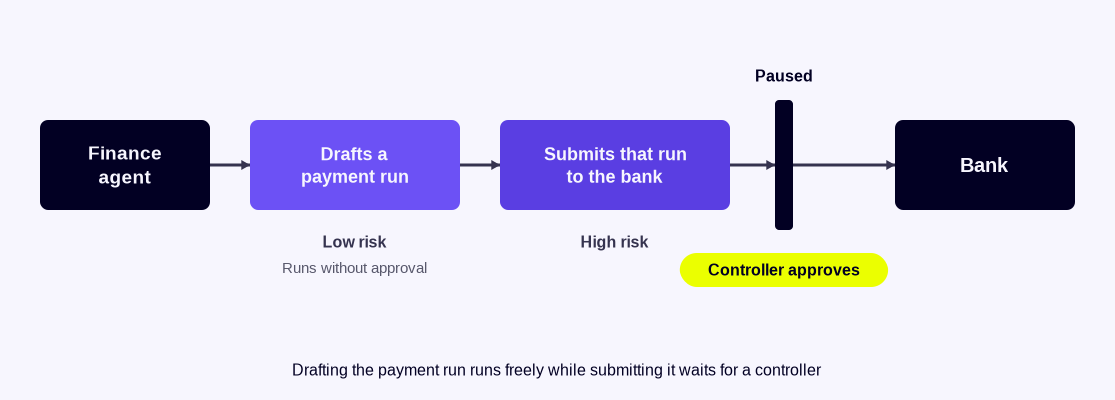
Actions that move money, change records others rely on, send messages outside the company or delete data should wait for a named person to approve. Everything else can run. The goal is a short list of gated actions that people will actually review.
A finance agent that drafts a payment run is low risk. The same agent submitting that run to the bank is high risk, and it should pause until a controller approves it. If too many actions need approval, reviewers start clicking through, and the gate stops working.
Write the gated list per system, with an owner beside each line. Here's a starting point.
| Action type | Default setting | Why it matters |
|---|---|---|
| Reading files the user can already open | Runs without approval | The agent sees nothing the person couldn't see themselves |
| Drafting documents and messages | Runs without approval | A person still decides what gets sent or saved |
| Editing records in shared systems | Needs approval from the system owner | Other teams rely on those records being correct |
| Sending email or messages outside the company | Needs approval from the sender | Anything sent externally can't be pulled back |
| Moving money or submitting payments | Needs approval from a named controller | Financial errors carry direct cost and audit exposure |
| Deleting data or editing permissions | Blocked for agents entirely | Mistakes here are the hardest to detect and undo |
How do you audit actions taken by AI agents
You audit agent actions with logs that record which identity acted, which tool it called, what it touched and who approved it, reviewed on a fixed schedule by a named person. Logs nobody reads are storage, and they won't catch a problem until an incident forces someone to look.
Many teams stop at the log itself. About 39% rely on logging and post-action monitoring alone, with no runtime checks, which means problems surface only after the agent has acted. A weekly review works for most teams. The reviewer filters for gated actions, failed approvals and any agent touching a system outside its usual list. One unexpected write to the HR folder is worth a phone call that same day.
"Logs nobody reads are storage, and they won't catch a problem until an incident forces someone to look."
Running the review as a standing control
A permissions review only stays useful if it runs again whenever a connector, role or default changes. Treat it as a standing control with an owner and a date, the way you treat access reviews for people.
The first review takes a day. Later ones take an hour, because most settings won't have moved. What changes is the list of connectors, and every new one goes through the same five checks before it reaches users.
That rhythm is what separates governed AI from AI that grew without a plan. Lumenalta® builds the review into governed AI rollouts, with decision traceability and compliance controls embedded in delivery, so your own team can repeat it without outside help.
Table of contents
- What an AI agent access review should cover
- Give every agent an identity of its own
- Scope connectors to the systems each team needs
- File access should follow the labels you already trust
- Admin defaults decide what new users get on day one
- Which agent actions should wait for a person to approve
- How do you audit actions taken by AI agents
- Running the review as a standing control
See how an AI agent permissions review improves AI accuracy and controls spend.