


Connecting Claude to Databricks through MCP
NOV. 2, 2026
6 Min Read
Claude reaches governed lakehouse data most safely through a Databricks MCP server, with Unity Catalog deciding what every agent call can read or write.
The Model Context Protocol (MCP) gives an AI model one standard way to discover and call tools. Databricks now exposes parts of the lakehouse as MCP servers, so Claude can query a Genie space, search a vector index or run a governed function without custom glue code. That matters because agents are about to sit inside most enterprise software. Agents will be built into 40% of enterprise applications by the end of 2026, up from less than 5% in 2025, Gartner predicts.
The hard part isn't the connection. It's deciding which identity the agent runs as and which tables, functions and indexes it can touch. Get that right once in Unity Catalog, and the Databricks MCP Claude connection becomes a governed integration your platform team can extend.
Key Takeaways
- 1. Claude connects to Databricks as an MCP client, and the managed servers inherit the Unity Catalog permissions your data team already maintains.
- 2. Most of the setup effort sits in identity and grants, so settle scope with security and data owners before the first connection.
- 3. Give agents broad read access through curated tools and expose each write as one reviewed function with its own audit trail.
How Claude connects to Databricks through MCP servers
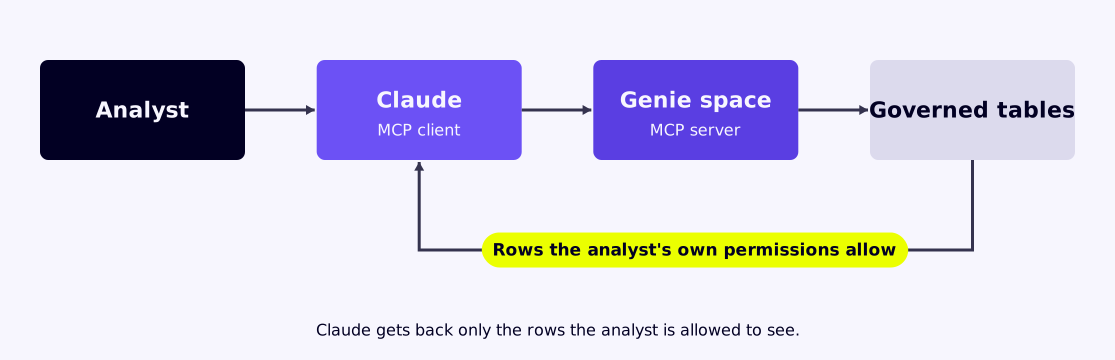
Claude acts as the MCP client, and Databricks hosts the MCP server. Claude discovers the tools a server offers, picks one for the task and sends a request. Databricks runs the request under an authenticated identity and returns only what that identity is allowed to see.
Picture an analyst asking Claude why regional margin dropped last quarter. Claude calls a Genie space exposed as an MCP tool, Genie writes and runs the SQL, and the answer comes back with the rows the analyst's own permissions allow. No data is copied into a separate store first, and no new pipeline is built. The analyst sees the same numbers the finance dashboard shows, because both read the same governed tables.
Which Databricks MCP servers an agent can actually use
Yes, Databricks supports MCP servers. Its managed MCP servers cover Genie spaces, Vector Search indexes, Unity Catalog functions and Databricks SQL, and Unity Gateway adds governed servers for external services. Most teams should start with managed servers, since they inherit existing permissions with no extra code.
Each option fits a different job, and the right first choice depends on what the agent has to do.
| MCP server type | What Claude can do with it | Permission that applies | A sensible first use |
|---|---|---|---|
| Genie space | Ask analytics questions in plain language and get governed answers | The user's access to the Genie space and its tables | Answering finance and operations questions from curated tables |
| Vector Search index | Retrieve the most relevant documents for a question | Access to the index and the source table behind it | Searching policy documents or product manuals |
| Unity Catalog functions | Run a specific, reviewed operation such as a customer lookup | EXECUTE rights on each function | Exposing a small set of approved actions to an agent |
| Databricks SQL | Run SQL against a SQL warehouse | Table grants and warehouse access for the identity | Exploratory work by technical users only |
| Unity Gateway service server | Reach services such as GitHub or Slack through Databricks | Unity Gateway grants plus the provider's own sign-in | Linking engineering tickets to lakehouse context |
Open SQL gives an agent the widest reach and the hardest audit. Functions and Genie spaces narrow what the agent can do, which is usually what a security review wants to see.
Why Unity Catalog permissions should govern every agent call
Unity Catalog should govern agent calls because it already holds your grants, tags, lineage and audit records. An agent that goes through it inherits every rule your data team has written. An agent that bypasses it needs a second permission system, and two systems drift apart within months.
Databricks makes the same point in its Unity Catalog update from Data + AI Summit 2026, noting that agents without a shared business definition will guess. For an MCP rollout, context means the table owner, the metric definition and the row filter travel with every call Claude makes.
A health insurer shows why this matters. Claims tables carry a tag for protected health information and a row filter by region. When Claude queries through a Genie space, both rules apply automatically, so a regional manager never sees another region's members.
The catch is that Unity Catalog can only enforce rules that exist. If your claims tables lack owners or tags today, the MCP rollout will expose that gap fast. Fix the grants and tags first, and the agent inherits them on day one.
Setting up a Databricks MCP server for Claude step by step
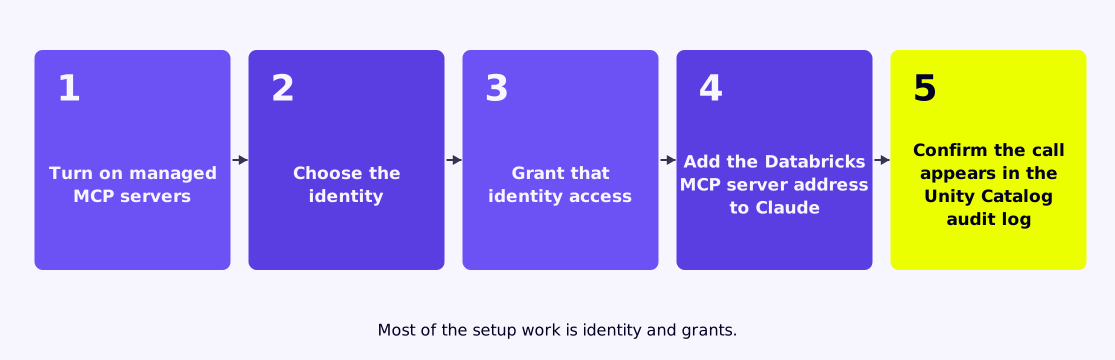
Setup takes five steps, and most of the work is identity and grants. The protocol side is short. Plan for the permission review to take longer than the configuration, because it's where security and data owners agree on scope. These steps assume managed MCP servers and a Claude client that supports remote MCP connections.
"An agent that bypasses it needs a second permission system, and two systems drift apart within months."
- Have a workspace admin turn on managed MCP servers in the workspace preview settings
- Choose the identity, either the signed-in user through OAuth or a service principal for shared agents
- Grant that identity access to the specific catalog, schema, tables and functions it needs
- Add the Databricks MCP server address to Claude as a custom connector and complete sign-in
- Test with a known question and confirm the call appears in the Unity Catalog audit log
User identity suits analysts, since each person sees only their own data. A service principal suits an automated agent, but it needs the tightest grants, because everyone using that agent inherits them.
How to scope tools so agents read more than they write
Scope agents to read first and write rarely. Give Claude read access through Genie spaces and vector indexes, and expose any write as a single reviewed Unity Catalog function. Each write path then has one owner, one test and one audit trail.
A logistics team wanted Claude to update delivery exceptions. The team didn't grant table write rights. Instead, it published one function that changes a single status field after validating the shipment ID. Claude can call it, but it can't touch any other column.
The cost is speed. Every new write action needs a function, a review and a test. That friction is useful, because it forces someone to decide if the agent should take that action at all.
Read access deserves the same care. A Genie space scoped to five curated tables gives Claude enough to answer most operations questions. Pointing it at a whole catalog invites slow, expensive queries and answers built on tables nobody has checked.
Where audit and monitoring fit in an MCP rollout
The audit trail has to be live before the first user connects. Unity Catalog records each query an agent runs under its identity, and those records belong in the same monitoring your security team already reviews. A gap here turns every incident into guesswork.
"Claude can call it, but it can't touch any other column."
The risk is growing, and Gartner expects that 25% of enterprise breaches will be traced back to AI agent abuse by 2028, from external and malicious internal actors. A bank running Claude through a service principal can alert when that principal queries a table outside its usual set. It can also cap daily query volume. Both checks use audit data the platform already collects, so they add little cost.
Why one accountable team should own the full integration
One team should own the data platform, the MCP configuration and the agent behavior. Split ownership creates a handoff, and handoffs are where permissions drift and tests get skipped. When one team owns the full path, a broken answer has one place to start.
Lumenalta® runs it that way as a certified Databricks Delivery Partner (DPP) and an Anthropic Select Partner. Teams of senior specialists and agents configure Unity Catalog, the MCP servers and the Claude connection as one piece of work, so it never turns into a second integration project.
The discipline is plain. Govern the data once, expose narrow tools, watch the audit log and expand only after each step holds. You'll spend less time on approvals later, because the rules were settled before the agent ever ran.
Table of contents
- How Claude connects to Databricks through MCP servers
- Which Databricks MCP servers an agent can actually use
- Why Unity Catalog permissions should govern every agent call
- Setting up a Databricks MCP server for Claude step by step
- How to scope tools so agents read more than they write
- Where audit and monitoring fit in an MCP rollout
- Why one accountable team should own the full integration
See how a governed Databricks MCP server improves AI accuracy and controls spend.