


9 AI agent security practices for regulated enterprises
NOV. 18, 2026
6 Min Read
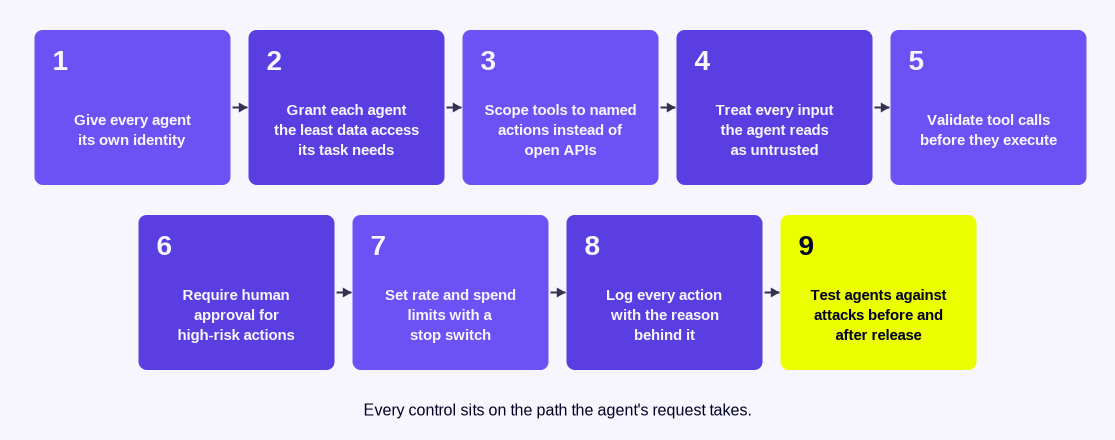
AI agent security works when every control follows the agent's request, from the identity it runs as to the audit record it leaves.
Regulated enterprises already know the cost of skipping this. Among organizations surveyed for IBM's 2025 breach report, 13% reported breaches of AI models or applications, and 97% of those lacked proper AI access controls.
Key Takeaways
- 1. Agents take actions that never appear in their replies, so security has to govern the identity, tools and audit trail around each action.
- 2. Narrow tools, least data access and validation in code outside the model limit what a manipulated agent can do.
- 3. Identity, least access and logging come first in a regulated rollout because they make every later control auditable.
Why chatbot controls fail once AI agents can act
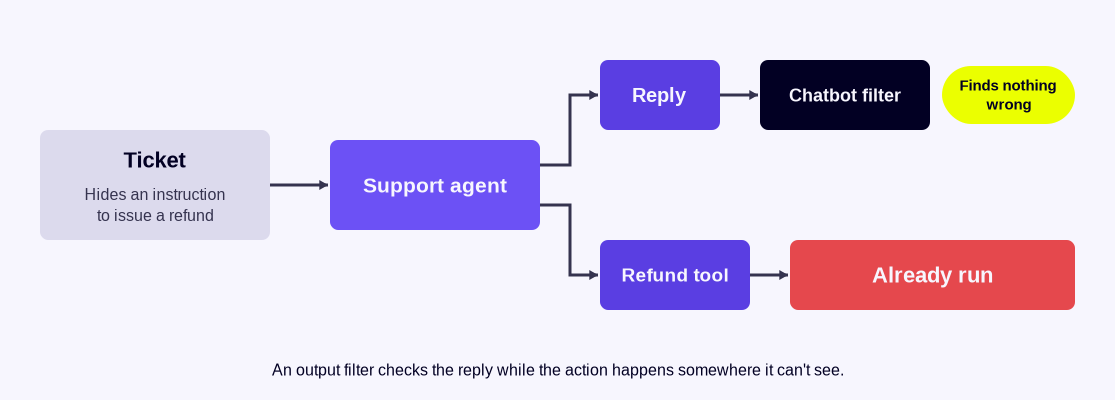
Chatbot controls filter what a model says. Agent controls have to govern what a model does. An output filter can block a harmful reply, but it can't stop a tool call that moves money, because that action never appears in the text.
Picture a support agent reading a ticket that hides an instruction to issue a refund. The chatbot filter checks the reply, finds nothing wrong and lets it pass, while the refund tool has already run. Securing AI agents means the identity, the tool scope and the audit trail sit around the action itself.
9 AI agent security practices for regulated enterprises
1. Give every agent its own identity
Each agent should run as its own service identity, never as a shared admin account. A separate identity lets you grant and revoke its access on its own. A bank running a claims agent and a fraud agent can then tell from the logs exactly which one touched a customer record. Shared identities blur that line, and an incident turns into days of working out which system acted. Pair each agent identity with a named human owner who approves its access changes.
2. Grant each agent the least data access its task needs
An agent should see only the tables, columns and rows its task requires. A mortgage assistant that answers rate questions doesn't need income records. Apply row filters and column masks at the data layer, so the rule holds no matter which tool the agent calls. Access granted at the prompt level fails the moment someone rewrites the prompt. Review grants every quarter, since agent tasks grow faster than their permissions get updated.
"Securing AI agents means the identity, the tool scope and the audit trail sit around the action itself."
3. Scope tools to named actions instead of open APIs
Expose specific, reviewed actions to an agent, such as "update claim status", rather than a general API or open SQL. A narrow tool limits what a manipulated agent can do. An insurer gave its agent one function that changes a single status field after checking the claim ID. The agent can't edit payouts, because no tool lets it. Each new action then needs its own review, which is the point.
4. Treat every input the agent reads as untrusted
Emails, tickets and documents can carry hidden instructions, a pattern known as prompt injection. Mark external content as data the agent reads, never as instructions it follows. A wealth manager's research agent that reads public filings should never act on a line inside a filing that says to email a client list. Assume some input will be hostile, and let the next practices catch what this one misses.
5. Validate tool calls before they execute
Check every tool call against policy before it runs. Confirm the parameters are in range and the target record belongs to the right customer. A payments agent asked to refund $40 shouldn't be able to send $40,000 because a field was misread. Validation runs in code outside the model, so a manipulated prompt can't talk its way past it. A clear rejection lets the agent escalate instead of retrying blindly.
6. Require human approval for high-risk actions
Define which actions need a person to sign off, and enforce that in the workflow. Large payments and external messages are common candidates. A lender's agent can draft an adverse action notice, while a compliance officer approves it before it's sent. Keep the approval list short. If people approve everything, they'll stop reading what they approve.
7. Set rate and spend limits with a stop switch
Cap how many actions an agent can take per hour and how much it can spend on model calls and tools per day. Limits contain the damage from a loop or an attack. Add a stop switch that any on-call engineer can trigger to suspend the agent at once. A trading support agent that suddenly fires hundreds of queries should hit its ceiling and alert someone long before it reaches a market system. Test the stop switch on a schedule, because an unused one often fails when you need it.
8. Log every action with the reason behind it
Auditors in regulated sectors will ask what the agent did and why. Each audit record should capture five things.
- The agent identity and the human owner it acts for
- The input or request that started the action
- The tool called and the exact parameters sent
- The data the agent read to make the decision
- The result, including any approval or rejection
Store them with your existing security logs.
9. Test agents against attacks before and after release
Run adversarial tests before launch and keep running them in production, including prompt injection and attempts to reach data outside scope. The threat is growing, and Gartner expects 25% of enterprise breaches to be traced back to AI agent abuse by 2028. Agents need the right context to make business-correct decisions. In security terms, that context is the permissions, definitions and lineage your tests should check the agent respects. Rerun the suite after every model or prompt change.
| Practice | What it protects in plain terms |
|---|---|
| 1. Give every agent its own identity | You can trace any action to one agent and one owner. |
| 2. Grant each agent the least data access its task needs | A compromised agent can expose only the data its task uses. |
| 3. Scope tools to named actions instead of open APIs | The agent can take only actions someone has reviewed. |
| 4. Treat every input the agent reads as untrusted | Hidden instructions in content don't become commands. |
| 5. Validate tool calls before they execute | Code outside the model blocks out-of-policy actions. |
| 6. Require human approval for high-risk actions | A person signs off where the stakes are highest. |
| 7. Set rate and spend limits with a stop switch | Runaway loops and attacks hit a ceiling fast. |
| 8. Log every action with the reason behind it | Auditors can see what happened and why. |
| 9. Test agents against attacks before and after release | Weak spots surface before an attacker finds them. |
How to apply AI agent security in a regulated rollout
Start with practices 1, 2 and 8, because identity, least access and logging cost little and make every later control auditable. Add tool scoping and validation before the agent takes any write action, then bring in approvals, limits and ongoing tests as its reach grows.
"If people approve everything, they'll stop reading what they approve."
Lumenalta® builds these controls into Claude deployments as an Anthropic Select Partner, with decision traceability and compliance controls embedded in delivery. A team that ships identity and logging in week one won't have to retrofit them after the first audit.
Table of contents
- Why chatbot controls fail once AI agents can act
- 9 AI agent security practices for regulated enterprises
- 1. Give every agent its own identity
- 2. Grant each agent the least data access its task needs
- 3. Scope tools to named actions instead of open APIs
- 4. Treat every input the agent reads as untrusted
- 5. Validate tool calls before they execute
- 6. Require human approval for high-risk actions
- 7. Set rate and spend limits with a stop switch
- 8. Log every action with the reason behind it
- 9. Test agents against attacks before and after release
- How to apply AI agent security in a regulated rollout
See how AI agent security improves AI accuracy and controls spend.